Delta tables Read, Write, History check, and vacuum using Python
“By the end of this article, you will learn how to access delta table using Python and how to do CRUD operations on delta table using Python”
In the earlier blog, we discussed delta lake and learned how to implement a lake house using Delta Lake. Please find below blog post for more details.
Introduction:
Today, we will discuss the points below.
- What is delta-rs?
- Setup system for hands-on
- Read Delta tables using Python (Delta-rs)
- Write into Delta tables using Python
- Check the history of the delta table using Python
- Check the delta table schema and files created at the file server level using Python
- Check versions of delta tables using Python
- Read specific version delta table using Python
- Apply to optimize vacuum operation on delta table using Python
- Read delta tables (stored on ADLS or S3 bucket) using Python
What is delta-rs?
As we discussed in the earlier blog. that as of now we have the below options to deal with Delta Lake format in Lakehouse
- Apache Spark
- Rust (delta-rs)
- Python (delta-rs)
Apache Spark supports all the features/options of Delta Lake, while Rust and Python are still not supporting all the features/options. It is not always easy to deploy Apache Spark and always read or write data into delta format using Apache Spark or Databricks. Most of the Data Engineers/Data Scientists know Python and if we have the option to read delta tables using Python, it will be really handy. That’s what delta-rs does.
This library provides low-level access to Delta tables in Rust, which can be used with data processing frameworks like datafusion, ballista, polars, vega, etc. It also provides bindings to other higher-level languages Python.
Still, all the features/operations are not supported in Python. Please check the below table for which features are currently supported with Python.

In the next section, we will do hands-on. And before that, we will set up our system.
Set up a System for hands-on
We will be doing all the operations with Python. So here there will be no need for Apache Spark. You can use a local laptop where Python is installed or you can also use a docker container where Spark is installed.
Need to install python package “delta lake”. To install the package, use the below command
pip install deltalake
Also, clone the GitHub repo which has Python code that we execute and learn today and also has an initial delta table.
https://github.com/developershomes/Lakehouse/tree/main/Delta-rs
Once you clone the GitHub repo, you will see below the initial delta table.

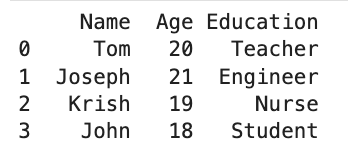
This delta table has the below data.
Read Delta tables using Python (Delta-rs)
No, we have our initial set-up ready. We will now read delta tables using Python. For that, we will use the below code.
Here, we have read our first delta table using Python. We have given the path of the delta table and in the next statement, we have converted the delta table into a panda data frame. Once we execute this command as an output it will print the panda data frame.

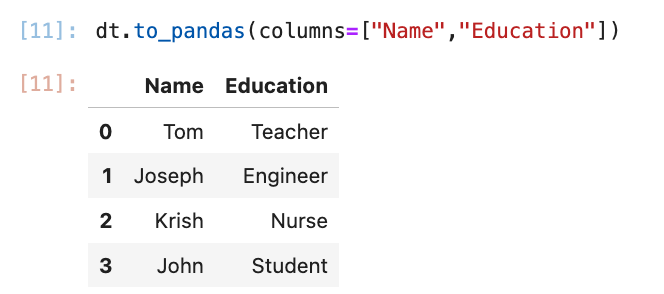
If you want to read specific columns instead of all columns from the delta table, we can specify columns as below.
Write into Delta tables using Python
If you check the above table, which shows supported features with Python. It says write is not supported with Python. Because it is not supported with all the versions of the Delta table. When we create the Delta table, based on Spark Engine and the specified version it will create the Delta table. We can check the Delta file version from the metadata file. Which shows read and write protocol.
By default, minimum read version protocol is 1 and the minimum write version protocol is 2. (For Delta Lake OSS)
For our Delta table

If you create that Delta table using Databricks Spark Engine, this read & write version will be higher. So, if you want to write on those delta tables which are created by Databricks, Python is currently not supported with that.
But with our delta table, we can write (append data) using Python.
We will use the below code for inserting rows into the existing delta table.
Here, we are first preparing the panda data frame, and in the next statement writing it to the Delta table.

Check the history of the delta table using Python
Using Python, we can also check the history of the delta table. We will use the below command to check the history.

This is showing at what time which operations are done and which engine is used to do the operation.
Check the delta table schema and files created at the file server level using Python
Using the below Python method, we can check the schema of the delta table.

The output shows that we have three columns in the table and also shows each column’s data type, nullable or not, and metadata if any.
We can also use the below python method to check what all files are created at the file server level.

if we check same at file server level

Check versions of delta tables using Python
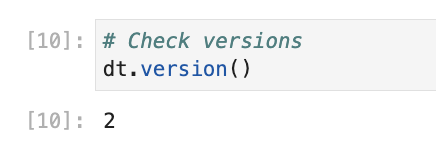
We can also check the delta table’s active version using the below command
Read specific version delta table using Python
If in case, we want to read data from a specific version of the delta table, we can also do this using Python.
For example, we want to read data from version 0. We will use the below code to do that.

For version 1 and version 2, we will use the below code.

Apply to optimize vacuum operation on delta table using Python
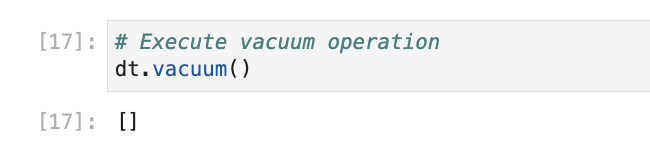
Using Python, we can also run optimize operations. But not all of the optimization operations are currently available with the delta table. For now, only vacuum operation is supported with the Python library.
We will run a vacuum operation. on our delta table, it will not do anything as we have just created a delta table and Vacuum can delete history older than a week.
Read delta tables (stored on ADLS or S3 bucket) using Python
Using Python, we can also read the delta tables created on AWS or ADLS. You can use the below code to read data from ADLS.
Conclusion
Here, we have learned how can we read and write data into the Delta table using Python.
For more interesting articles and to learn about Data Engineering. follow me on LinkedIn/Twitter/Medium.
 Developers' HOME
Leave a comment